
All the multiplexers have Led lamps that signal activity on the inputs or outputs and other situations.
Nmea2Wifi KIT and TH - Green Led to indicate data being received at port P1; Red Led to indicate data being received at port P2; Blue Led (in the ESP8266 module) to indicate data being sent out on port P3
Nmea2Wifi SMD - Green Led to indicate data being received at port P1; Red Led to indicate data being received at port P2; Blue Led to indicate data being sent out on port P3 and Yellow Led to indicate data being received or being sent out by Wifi.
Nmea3Wifi and Nmea4Wifi - Inputs have Green Leds and outputs have Red Leds. There is also a Blue LED that blinks when data is being received by Wifi or is being sent out by Wifi. TH (Through Hole) models also have a Red LED which indicates that the unit is turned on. The Leds in the SMD (Surface Mounting Devices) models are very small but they are as bright as the 3mm Leds used in the TH models.
N2K0183 - Nmea0183 inputs have Green Leds (PX Led is inside the box) and output has a Red Led. There are 2 Blue Leds, one for Wifi and another for N2K bus activity.
Nme3Pro - Green LEDs indicate data being received through the NMEA 0183 input ports P1, P2 and P3. The NMEA 0183 output port P4 has a Red LED. The SeaTalk1 and N2K interfaces each have a Green LED for received data and a Red LED for transmitted data. A Blue LED indicates WiFi activity, while a Yellow LED indicates USB activity.
Here is a picture for the case of the Nmea3Wifi TH multiplexer
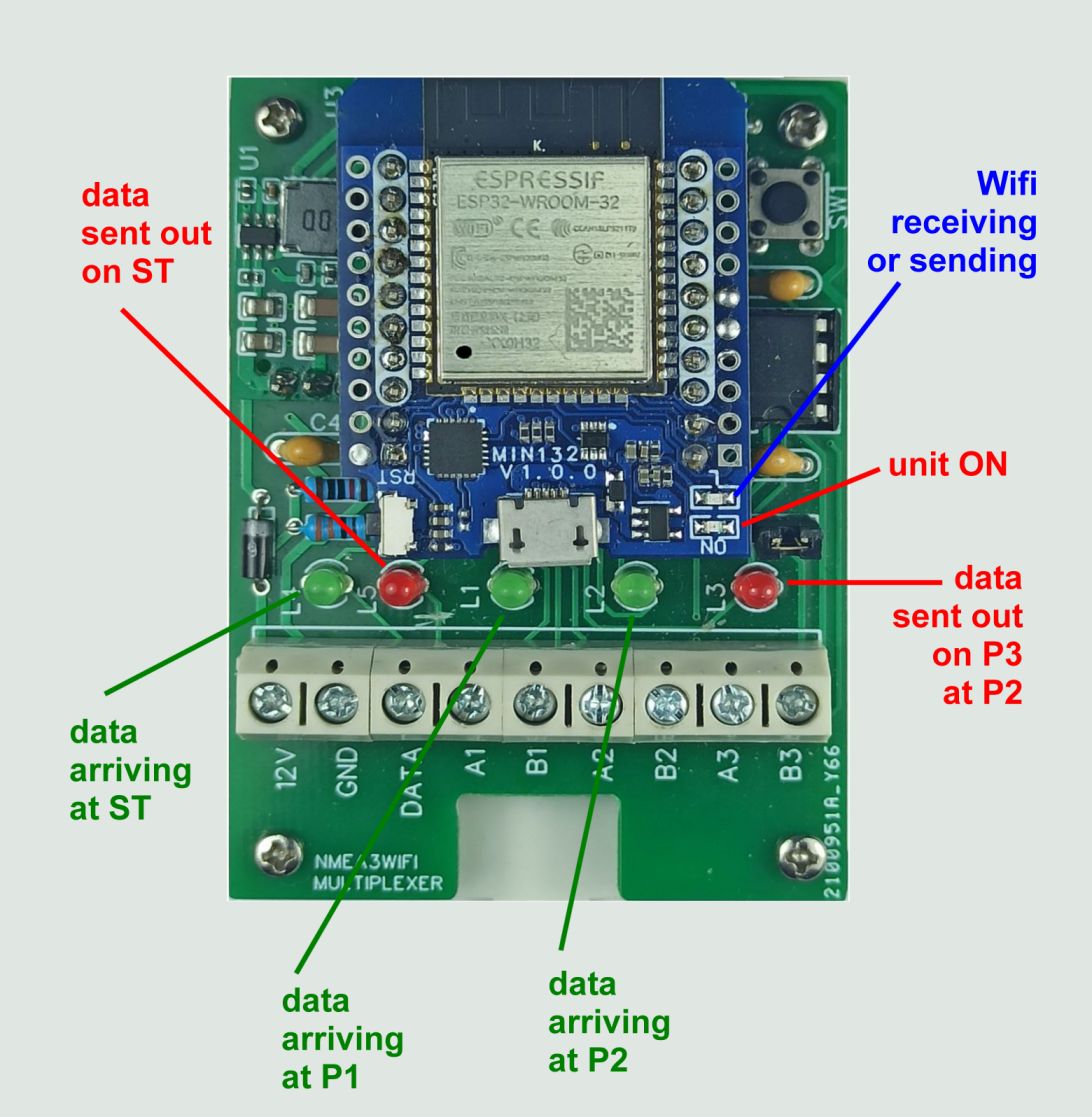
The descriptions below refer primarily to the Nmea2Wifi, Nmea3Wifi, Nmea4Wifi and N2K0183 multiplexers. For information about the LED sequences used by the Nme3Pro during start-up, factory reset and hardware self-testing, please consult the Nme3Pro User Manual.
Power Up - On the Nmea3Wifi and Nmea4Wifi multiplexers, after power up, the Leds blink in succession from left to right (as defined in the previous picture) to indicate that the AP network was created successfully. If connection to an external network was set, Leds blink in succession from right to left when the connection is achieved.
Hard Reset - when the Hard Reset switch is pressed, all Leds turn on. The switch should not be released while the Leds are on. After 2 seconds the Leds turn off and the switch can be released for the Reset to be taken. Otherwise it will be ignored. In the N2K0183 (and latest Nmea3Wifi and Nmea4Wifi firmwares) if you maintain the Hard Reset pressed after the Leds went off, they will go on again 10 seconds after the switch was pressed. And 2 seconds more (12 seconds since the beginning) they go off again. If you release the switch at this stage, the multiplexers will start with factory settings but the AP they create is not protected (no password needed). You can revert to normal AP password protection by doing a another hard reset and releasing the switch after 2 (and before 10) seconds.
Hardware Testing - It is possible to test the serial output driver and the input optocouplers using a procedure described in the forum here for the case of the Nmea4Wifi multiplexer. For the case of the N2K0183 you can see here. The Leds will blink or not blink to indicate normal operation or a failure.